
One calendar for everyone’s cycle
Track your own cycle for free. Keep the people you care about in view, with sharing on your terms.
Beta policies remain drafts pending implementation checks and an effective date. The owner reports legal review completed.
Coming soon

The shared calendar
See both cycles at a glance.
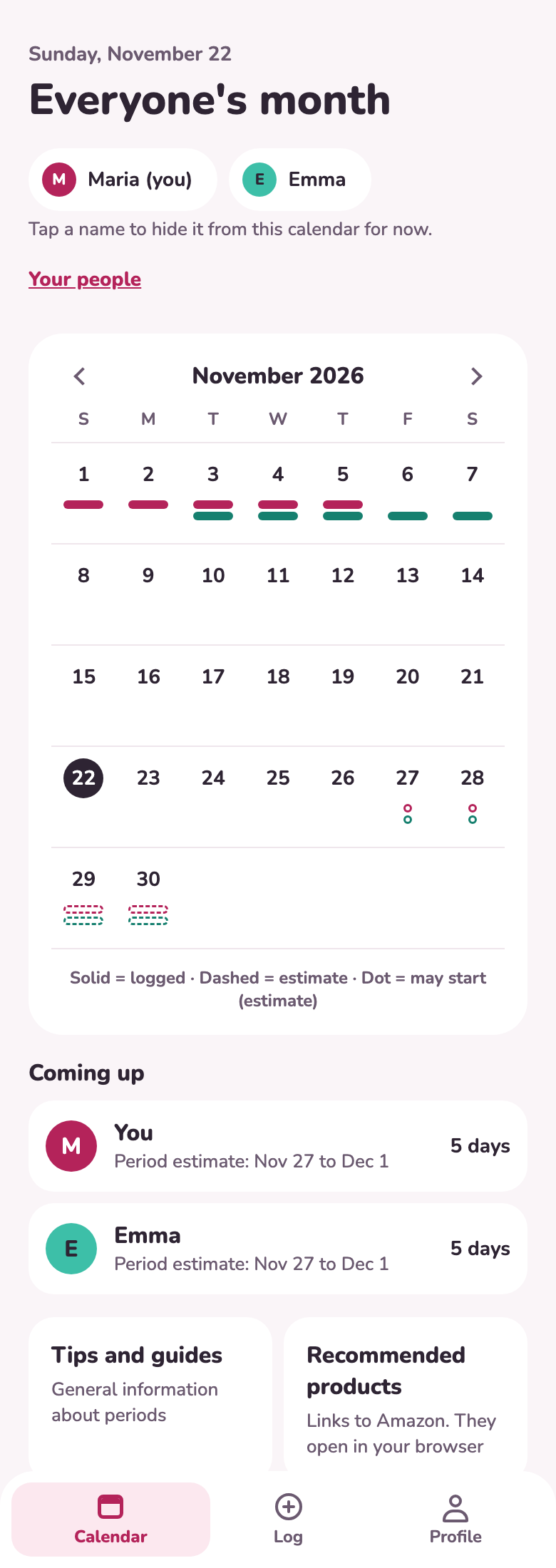
One colour per person. Separate entries on the same calendar, even when periods overlap.
A solid line is a day someone logged. Later in the same month, on the 27th to the 30th, a dot is a day a period may start and a dashed line is an estimated period. Estimates are a span of days, not a promise.
Logged this month
- Maria 1 to 5, logged
- Emma 3 to 7, logged
- Both 3 to 5
Estimated later this month
For families
One phone for the family, or a phone each.
On one phone
A mother can keep herself and her daughters as separate profiles and log for each of them on her own phone. No account is needed, and her daughters need no account or phone of their own. Tracking yourself is free; the paid plan adds up to 3 more people.
On separate phones
When each person tracks on their own phone, each has their own account. The person sharing makes an invite code, chooses which categories the other person sees, and whether that person may also log for them. The other person enters that code on their phone. Sharing goes one way; sharing back is a separate invite. Notes are excluded from ordinary sharing; Backup and hand-over include them.
Each person’s control
You decide what each person sees.
Sharing between phones starts with an invite code from your account to theirs. It goes one way, to one person at a time. You switch on only what you want them to see, and whether they may log for you. Change it or stop whenever you like. Sharing back is a separate invite.
What can be shared
- Period daysYour choice
- PredictionsYour choice
- FlowYour choice
- SymptomsYour choice
- MoodYour choice
- NotesNot in ordinary sharing
Backup and hand-over include notes. They are separate from ordinary account sharing.
Pricing
Free for yourself. One plan when you add people.
Tracking yourself is free. The paid plan is for tracking or following up to 3 more people on one shared calendar, counting profiles on your phone and linked accounts together.
| Free | $0 | Track your own cycle. No time limit. |
|---|---|---|
| Monthly | $0.99 a month | Renews every month. Cancel any time. |
| Yearly | $11.99 a year | Renews every year. Cancel any time. |
| Lifetime | $24.99 once | Pay once. No renewal. |
The person who views or logs for others needs the plan. Being followed is free.
There is no free trial. The free plan for yourself is the way to try the app.
If a plan ends, the other people are hidden, not deleted, and come back when the plan does.
Prices are in US dollars and are billed by Apple or Google. The price shown in your store at the time of purchase is the one that applies, and may differ by country and include tax.
The definition of lifetime access and shutdown/refund treatment remain proposals in the terms draft, pending owner review.
Privacy, plainly
Tracking starts on your phone, with no account.
Tracking starts on your phone. Signing in and agreeing to save your own tracking is a separate choice from optional Backup of other people’s phone profiles. Backup and hand-over include notes; ordinary account sharing excludes notes.
The beta code includes RevenueCat billing traffic even without sign-in or purchase after the age gate. Optional usage counts use a random install identifier and date. Turning counts off does not stop billing traffic.
More about what the app does and does not send
Server health fields are encrypted, but the API has the key and can read them. Names, dates and relationship metadata are not field-encrypted. This is not end-to-end encryption; deployment and provider retention remain unverified.
- No advertising SDK or third-party analytics SDK. Four first-party counts are on by default after the age gate; turn them off in Profile. A random identifier does not guarantee anonymity.
- Account consent, Backup and hand-over are distinct. The holder’s agreement does not establish every subject’s or guardian’s consent. These questions must be resolved before real-data use.
- RevenueCat is integrated. Anonymous app-user or account billing identifiers, purchases and technical/network data support billing. The app sends it no cycle entries, notes, names or email attributes.
- Local storage fails closed if secure storage or legacy conversion fails. Native-device protection and recovery still need verification.
- Withdrawal does not delete existing records or end sharing. Delete copies and stop sharing separately.
- Draft policies are inactive. Hosted account operations, provider retention and the rights request process remain unverified.
Coming soon to the App Store and Google Play.
Family Flow Tracker is for people aged 13 or older. It does not offer fertility, ovulation, contraception or pregnancy features.